
How Does a Building Management System Work? Step-by-Step Guide
A Building Management System (BMS) works by collecting information from sensors and connected equipment, processing that information through controllers, applying programmed control logic, and sending commands back to building systems. The process then repeats continuously, allowing the building to respond to changing conditions.
In a modern building, this can mean adjusting heating when temperatures fall, increasing ventilation when indoor air quality changes, reducing lighting in unoccupied areas, identifying equipment alarms, or monitoring energy consumption.
The basic BMS operating cycle can be summarised as:
Sense → Communicate → Process → Decide → Control → Verify → Analyse
This guide explains each stage in practical terms, including BMS architecture, sensors, controllers, actuators, communication protocols, HVAC control, energy management, alarms, user interfaces, real-time monitoring and the role of AI and IoT.
What is a Building Management System?
A Building Management System is a computer-based system used to monitor, control and coordinate building services and equipment.
A BMS commonly interacts with:
- Heating systems
- Ventilation systems
- Air conditioning
- Chillers
- Boilers
- Pumps
- Fans
- Lighting
- Energy meters
- Water systems
- Indoor air-quality equipment
- Access-control systems
- Other building services where appropriate
The exact scope depends on the building and system design.
The key purpose is to bring information from different parts of a building into a coordinated control environment. This allows facility teams to monitor operating conditions, automate routine actions, investigate alarms and analyse historical performance.
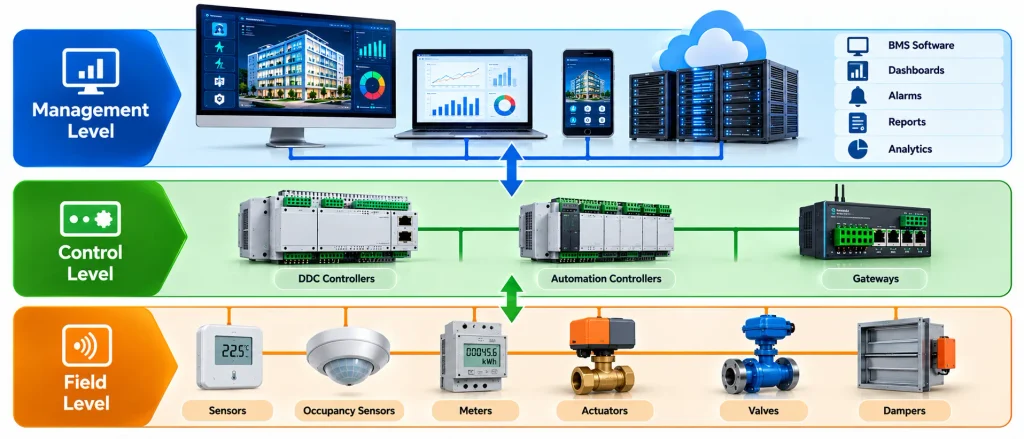
Industry BMS guidance commonly describes the architecture in three broad levels: field devices, automation/controllers and the supervisory or management level.
How does a BMS Work in Simple Terms?
A BMS works much like a continuous feedback loop.
Imagine a meeting room where the temperature has been configured to remain within a particular range.
- A temperature sensor measures the room temperature.
- The sensor sends the measurement to a controller.
- The controller compares the measurement with the configured setpoint.
- The control logic determines whether an adjustment is required.
- A command is sent to the relevant HVAC equipment.
- An actuator or controlled device changes the equipment operation.
- The sensor measures the new condition.
- The BMS checks whether the desired condition has been achieved.
- The process continues automatically.
The important point is that a BMS does not simply send one command and stop. It continuously receives feedback and adjusts operation according to programmed logic.
Modern HVAC applications can also use occupancy and indoor-air-quality information to adjust ventilation and cooling or heating demand.
The Three Main Levels of BMS Architecture
Understanding BMS architecture makes the complete operating process easier to understand.
Field Level
The field level contains the physical devices that interact directly with the building.
Typical devices include:
- Temperature sensors
- Humidity sensors
- CO₂ sensors
- Pressure sensors
- Flow sensors
- Occupancy sensors
- Energy meters
- Valves
- Dampers
- Actuators
- Input/output modules
The field level can be considered the connection between the physical building and the digital control system.
Automation Level
The automation level contains controllers that receive information from field devices and apply programmed control sequences.
Controllers can:
- Receive sensor inputs
- Process measurements
- Compare values with setpoints
- Execute control logic
- Control equipment
- Generate alarms
- Communicate with supervisory software
Direct Digital Controllers (DDCs) are commonly used for these functions.
Management Level
The management or supervisory level provides the operator interface.
It can display:
- Equipment status
- Temperatures
- Energy consumption
- Alarms
- Trends
- Schedules
- Historical information
- System graphics
- Performance information
Operators can use this interface to monitor the building and, where authorised, modify appropriate settings.
This three-level structure is described consistently in current BMS industry guidance.
Step-by-Step: How Does a BMS Work?
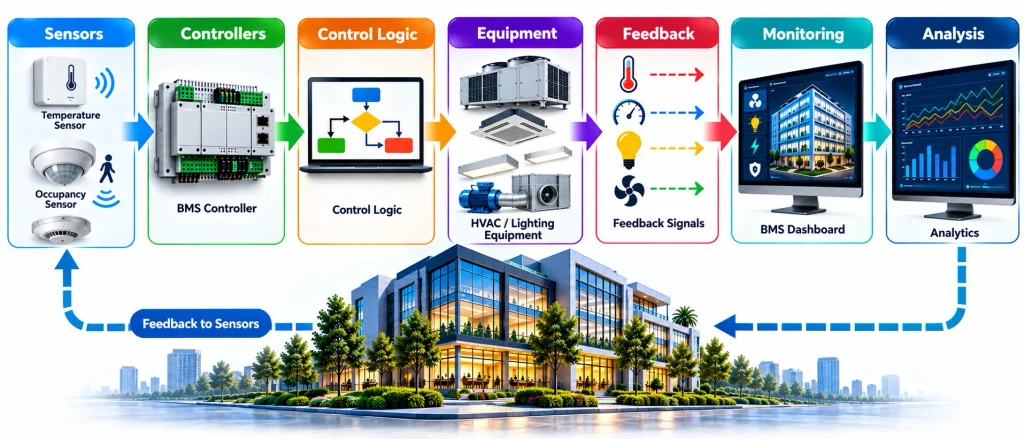
A Building Management System works through a continuous cycle of sensing, processing, controlling and monitoring building conditions.
Step 1: Sensors Collect Data
Sensors monitor conditions throughout the building, including:
- Temperature
- Humidity
- CO₂ levels
- Pressure
- Occupancy
- Energy consumption
Accurate sensor data helps the BMS make reliable control decisions.
Step 2: Data Is Sent to Controllers
The collected information is transmitted to BMS controllers through wired or wireless networks. Common communication methods include Ethernet, field networks, gateways and building automation protocols.
Step 3: Controllers Process the Data
Controllers compare the collected information with programmed settings.
For example, if a room becomes warmer than its cooling setpoint, the controller can determine that additional cooling is required.
Step 4: Control Logic Determines the Action
The BMS applies programmed rules based on factors such as:
- Setpoints
- Time schedules
- Occupancy
- Equipment status
- Operating limits
- Safety conditions
This determines how the building system should respond.
Step 5: Commands Are Sent to Equipment
The controller sends instructions to connected equipment to:
- Start or stop
- Increase or reduce speed
- Open or close
- Increase or reduce output
Step 6: Equipment Responds
Actuators and connected equipment carry out the command. For example, a valve may open to increase chilled-water flow and provide additional cooling.
Step 7: The BMS Checks the Response
Sensors provide feedback to confirm whether the required result has been achieved.
The basic process is:
Measure → Decide → Act → Measure Again
Step 8: Alarms Are Generated
If a condition exceeds a configured limit, the BMS can generate an alarm.
Examples include:
- High temperature
- Equipment failure
- Pump or fan failure
- Communication failure
- Abnormal energy consumption
Step 9: Information Is Displayed
The BMS dashboard presents important information to facility teams, including:
- Equipment status
- Temperature readings
- Alarms
- Energy data
- Operating schedules
- System trends
Step 10: Data Is Stored and Analysed
Historical information can help identify energy trends, recurring faults, equipment performance and unusual operating conditions.
Step 11: Operators Review Performance
Facility professionals can review alarms, trends and equipment data, then investigate faults, adjust appropriate settings or arrange maintenance.
Step 12: The Cycle Continues
The BMS continuously repeats the process:
Sensors → Controllers → Control Logic → Equipment → Feedback → Monitoring → Analysis → Optimisation
This continuous feedback loop allows building systems to respond to changing conditions while supporting efficient and controlled operation.
How Does a BMS Control HVAC?
HVAC is one of the most common applications of BMS technology. A BMS can monitor and control equipment such as:
- Air handling units
- Chillers
- Boilers
- Pumps
- Fans
- Fan coil units
- Dampers
- Valves
- Cooling towers
- Variable-speed drives
For example, when room temperature rises above the configured cooling setpoint, the BMS detects the change, processes the information through the controller and adjusts the relevant HVAC equipment. Sensors then provide feedback so the system can continue regulating conditions.
This allows HVAC operation to respond to actual building conditions rather than relying only on fixed manual settings.
BMS Architecture Explained
A traditional BMS can be understood through three broad levels.
Field Level
The field level contains devices that directly measure or influence physical conditions.
Typical devices include:
- Temperature sensors
- Humidity sensors
- Pressure sensors
- Flow sensors
- Occupancy sensors
- Energy meters
- Valves
- Dampers
- Actuators
- Thermostats
This level connects the digital BMS environment with the physical building.
Automation or Control Level
The automation level contains controllers that process information and execute programmed control strategies.
Typical functions include:
- Receiving sensor information
- Applying control logic
- Managing equipment sequences
- Controlling outputs
- Generating local alarms
- Communicating with supervisory systems
Direct Digital Controllers (DDCs) are commonly used in building automation applications.
Management or Supervisory Level
The management level provides the operator interface.
It may include:
- Graphical dashboards
- Alarm screens
- Trend graphs
- Energy reports
- Equipment schedules
- Historical data
- User permissions
- Remote access
- Performance information
This three-level model is also reflected in current BMS technical explanations from industry sources.
Main Components of a Building Management System
A BMS is not a single piece of equipment. It is a combination of hardware, software, networks and control logic.
Sensors
Sensors collect information about the physical environment and equipment.
Common BMS sensors include:
- Temperature sensors
- Humidity sensors
- Pressure sensors
- CO₂ sensors
- Occupancy sensors
- Flow sensors
- Light sensors
- Air-quality sensors
Accurate sensing is essential because the control system depends on reliable input data.
Controllers
Controllers process inputs and execute programmed logic.
A controller can determine whether equipment needs to start, stop, increase output, reduce output or remain in its existing operating state.
Actuators
Actuators translate control signals into physical actions.
Examples include:
- Motorised valves
- Damper actuators
- Variable-speed drives
- Relay outputs
- Motor controls
Control Panels
Control panels house controllers, power supplies, communication equipment and associated components.
They provide the physical infrastructure required to connect field equipment with the BMS network.
BMS Software
BMS software provides the supervisory interface through which operators can monitor and control building systems.
Typical features include:
- Equipment graphics
- Alarm management
- Trend analysis
- Scheduling
- Reporting
- User management
- Historical data
- Remote monitoring
Communication Network
The communication network allows different devices and systems to exchange information.
The network may contain:
- Ethernet infrastructure
- Controllers
- Gateways
- Routers
- Switches
- Wireless devices
- Protocol interfaces
Energy Meters
Meters provide information about electricity, gas, water or other energy-related consumption.
Sub-metering can provide more detailed information about individual areas, equipment or systems.
What Systems Can a BMS Control?
The exact scope varies from building to building.
HVAC
HVAC is one of the most common BMS applications.
A BMS may monitor and control:
- Air handling units
- Fan coil units
- Chillers
- Boilers
- Pumps
- Cooling towers
- Fans
- Dampers
- Valves
- Temperature setpoints
Lighting
BMS integration can support:
- Lighting schedules
- Occupancy-based control
- Time-based switching
- Daylight-related strategies
- Central monitoring
Energy
Energy-related functions can include:
- Electricity monitoring
- Meter collection
- Demand monitoring
- Consumption analysis
- Energy benchmarking
- Load scheduling
Water Systems
Depending on the installation, a BMS can monitor:
- Water pumps
- Tank levels
- Flow
- Temperature
- Pressure
- Equipment status
Security and Access Control
Some BMS environments integrate with:
- Access control
- CCTV platforms
- Intrusion detection
- Security alarms
However, the BMS integration layer should not be confused with the dedicated security system itself.
Fire and Life-Safety Systems
BMS platforms may receive information from fire and life-safety systems where appropriate.
The fire system normally remains a dedicated life-safety system with its own design, controls and applicable compliance requirements.
BMS Communication Protocols
Communication protocols are an important part of a Building Management System because they allow different controllers, sensors, meters and building equipment to exchange information. The right protocol can make it easier to integrate systems from different manufacturers and create a more connected building automation environment.
BACnet
BACnet is a widely used communication protocol specifically developed for building automation and control applications. It can support communication between devices such as HVAC controllers, sensors, meters and supervisory BMS platforms.
BACnet is commonly used where multiple building systems need to exchange operational information through a structured communication network.
Modbus
Modbus is widely used in industrial automation and is also common in building management applications. It can enable communication between equipment such as energy meters, controllers, HVAC systems, pumps and other devices.
Its widespread use makes Modbus useful when integrating different types of equipment into a BMS, particularly where operational data needs to be collected from individual devices.
KNX
KNX is an established building automation technology used for applications such as lighting, HVAC, room control and other building functions.
It can allow different building devices to communicate within an integrated automation environment, supporting coordinated control and monitoring.
Why Communication Protocols Matter
The choice of communication protocol can influence how effectively a BMS integrates with existing and future building equipment.
Important considerations include:
- Interoperability
- System integration
- Scalability
- Equipment compatibility
- Vendor flexibility
- Maintenance requirements
- Data availability
- Future expansion
A well-designed BMS should consider both current equipment and potential future requirements. Using suitable, well-supported communication technologies can simplify integration and help reduce compatibility problems when different manufacturers or systems are involved.
Protocol Selection in BMS Projects
There is no single communication protocol that is suitable for every building. Selection depends on the equipment being integrated, project requirements, system architecture, available infrastructure and future expansion plans.
Protocols such as BACnet, Modbus and KNX can each play different roles within building automation. The key objective is to create a reliable communication environment in which building systems can exchange useful information and support effective monitoring and control.
BMS vs BAS: What is the Difference?
BMS and BAS are frequently used interchangeably, but terminology can vary between markets.
| BMS | BAS |
|---|---|
| Building Management System | Building Automation System |
| Often emphasises monitoring and management | Often emphasises automation and control |
| Commonly used in facility management | Commonly used in building automation |
| Can include dashboards, alarms and reporting | Strong emphasis on automated equipment control |
| Scope varies by system | Scope varies by system |
The practical difference depends on the supplier, project specification and regional terminology rather than a universal technical boundary.
BMS vs EMS vs BEMS
These systems can overlap but often have different primary objectives.
| System | Primary Focus |
|---|---|
| BMS | Building-wide monitoring and control |
| BAS | Building automation and equipment control |
| EMS | Energy monitoring and optimisation |
| BEMS | Building energy management and optimisation |
A modern building may use several of these capabilities together rather than treating them as completely separate technologies.
J2 Innovations, for example, distinguishes energy-management-focused systems from broader comprehensive BMS platforms.
Types of Building Management Systems
Building Management Systems can be classified according to their architecture, building size, level of connectivity, control requirements and integration capabilities. Different BMS types are suitable for different operational environments, from small buildings with basic automation to large facilities requiring centralised monitoring, advanced analytics and multi-site management.
Standalone BMS
A standalone BMS is generally designed for smaller buildings or specific building applications where extensive system integration is not required.
It can provide essential functions such as:
- Temperature monitoring
- HVAC control
- Equipment scheduling
- Basic alarms
- Local system monitoring
This type of system can be suitable where building automation requirements are relatively simple and the number of connected systems is limited.
Centralised BMS
A centralised BMS manages multiple building systems through a central supervisory platform. Information from different controllers and connected equipment can be brought together into one interface.
A centralised system can provide:
- Central monitoring
- Equipment control
- Alarm management
- Scheduling
- Trend and performance data
- Consolidated system visibility
This approach can make it easier for facility teams to monitor building operations from a single location.
Distributed BMS
A distributed BMS uses multiple controllers positioned across different areas or systems within a building. These controllers can perform local control functions while supervisory software coordinates overall building operations.
Key advantages can include:
- Local equipment control
- Improved scalability
- Reduced dependence on a single controller
- Flexible system expansion
- Better support for larger buildings
Distributed architecture is often useful where buildings have multiple zones, mechanical systems or operational areas.
Cloud-Connected BMS
A cloud-connected BMS uses internet-based platforms to provide remote access to selected building data and management functions. This can be particularly useful for organisations managing multiple buildings or facilities from different locations.
Potential benefits include:
- Remote monitoring
- Multi-site visibility
- Centralised analytics
- Portfolio-level reporting
- Remote performance review
However, cloud connectivity also requires appropriate cybersecurity, network protection, user authentication and access management.
IoT-Enabled BMS
An IoT-enabled BMS can connect a wider range of sensors, meters, equipment and smart devices to the building management platform. This allows organisations to collect more detailed operational data.
IoT integration can support monitoring of:
- Occupancy
- Energy consumption
- Indoor environmental conditions
- Equipment performance
- Space utilisation
- Environmental trends
By combining IoT devices with BMS platforms, building operators can gain greater visibility of building performance and use data to support automation, energy optimisation and maintenance decisions.
Choosing the Right BMS Type
The most suitable BMS architecture depends on factors such as building size, number of connected systems, operational complexity, budget, scalability requirements and future technology plans. A well-selected system should meet current requirements while providing sufficient flexibility for future expansion and integratio
Benefits of a Building Management System
A properly designed and operated BMS can provide several benefits.
Energy Efficiency
A BMS can automate schedules, coordinate HVAC operation and monitor energy consumption.
Energy savings depend on factors such as:
- Building design
- Equipment efficiency
- Control quality
- Occupancy
- Operating schedules
- Commissioning
- Maintenance
- Operator practices
Therefore, a BMS should not be presented as a guaranteed percentage energy-saving solution.
Improved Occupant Comfort
A BMS can help maintain appropriate:
- Temperature
- Humidity
- Ventilation
- Air quality
- Lighting conditions
Better Operational Visibility
Operators can see equipment status, alarms and trends from a central interface instead of manually inspecting every system.
Faster Fault Response
Alarm notifications can identify abnormal conditions and help maintenance teams investigate problems sooner.
Preventive and Predictive Maintenance
Historical trends can help identify unusual equipment behaviour and support maintenance planning.
Advanced analytics can extend this further by identifying patterns that may indicate developing faults.
Reduced Operational Waste
Scheduling and automated control can reduce unnecessary equipment operation during periods of low occupancy.
Remote Monitoring
Modern systems can allow authorised personnel to review building conditions remotely.
Better Data for Decision-Making
Historical data can help facility teams evaluate:
- Energy consumption
- Equipment performance
- Operating patterns
- Fault frequency
- Occupancy trends
- Maintenance requirements
Limitations and Challenges of BMS
A balanced BMS guide should also explain what a BMS cannot solve by itself.
High Initial Investment
Installation costs can include:
- Hardware
- Controllers
- Sensors
- Cabling
- Software
- Engineering
- Integration
- Commissioning
- Training
Legacy Equipment
Older buildings can contain equipment that was not designed for modern digital integration.
Retrofitting can therefore require gateways, replacement controllers or other interface solutions.
Integration Complexity
Different manufacturers may use different protocols, data structures and control approaches.
Integration requires careful engineering rather than simply connecting everything to one dashboard.
Poor Sensor Quality
A sophisticated BMS cannot compensate for consistently inaccurate or poorly positioned sensors.
Alarm Overload
Too many alarms can overwhelm operators.
Effective alarm management requires prioritisation, rationalisation and clear response procedures.
Skills and Training
A BMS produces information, but trained personnel are still needed to interpret that information and take appropriate action.
Cybersecurity Risks
Connecting building systems to networks and remote services creates cybersecurity considerations.
Poor Commissioning
A badly commissioned BMS can deliver disappointing results even when the underlying hardware is technically capable.
CIM also identifies integration complexity, limited energy monitoring in some traditional systems, cost and training as important BMS considerations.
BMS Installation Process
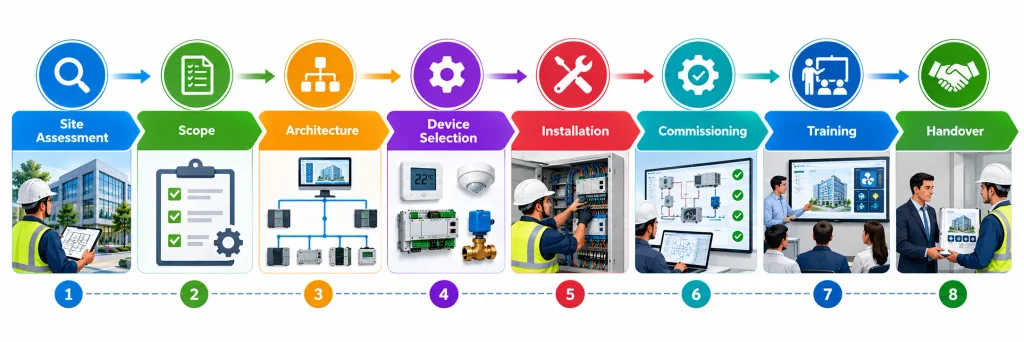
Installing a Building Management System involves much more than connecting sensors and controllers. A successful BMS project requires proper planning, system design, equipment selection, installation, programming, testing, commissioning and staff training. The process should also consider the building’s existing systems and future operational requirements.
Site Assessment
The first stage is to assess the building and its existing infrastructure. The project team should review:
- Building size and layout
- Existing HVAC and mechanical systems
- Electrical infrastructure
- Existing control systems
- Network and communication infrastructure
- Occupancy patterns and operating schedules
- Energy management objectives
- Future expansion or integration requirements
This assessment helps identify what can be integrated into the BMS and where additional equipment or modifications may be required.
Define the BMS Scope
The project scope should clearly establish what the BMS is expected to monitor, control and manage. Depending on the building, this may include HVAC, lighting, energy meters, pumps, fans, alarms and other connected systems.
The scope should identify systems that will be:
- Monitored
- Controlled
- Integrated
- Logged
- Alarmed
- Scheduled
- Reported
A clearly defined scope helps control project costs and prevents important requirements from being overlooked.
Select the BMS Architecture
The system architecture determines how controllers, field devices, networks and supervisory software will work together.
The design may consider:
- Centralised or distributed control
- Local equipment operation
- Cloud connectivity
- Remote monitoring
- Multi-building or multi-site management
- Network and communication requirements
The selected architecture should provide reliable operation while allowing the system to be expanded when building requirements change.
Select Devices and Communication Protocols
The next stage involves selecting suitable field devices and communication technologies. Common components include sensors, controllers, actuators, meters and gateways.
Communication protocols such as BACnet, Modbus and KNX may be considered depending on the equipment and integration requirements. Device selection should focus on compatibility, accuracy, reliability and future maintainability.
Engineering and Installation
Once the design is approved, the physical and software installation can begin. This may include:
- Installing control panels
- Installing temperature and environmental sensors
- Connecting controllers and actuators
- Configuring communication networks
- Integrating HVAC and other equipment
- Programming control sequences
- Developing BMS graphics and dashboards
Installation should follow the approved design and equipment manufacturer requirements.
Testing and Commissioning
Testing and commissioning confirm that the BMS operates as intended. Each connected device, control sequence, alarm and communication link should be checked.
The commissioning process may verify:
- Sensor readings
- Equipment commands
- Control sequences
- Alarm operation
- Scheduling
- Communication between devices
- Manual and automatic modes
- Data logging and trends
Any faults identified during testing should be corrected before the system is handed over to building operators.
Operator Training
Facility staff need practical training to use the BMS effectively. Training should cover normal system operation and the actions required when problems occur.
Key areas may include:
- Normal operation
- Alarm response
- Scheduling
- Manual overrides
- Trend and performance analysis
- Basic troubleshooting
- User access and permissions
- Escalation procedures
Good training helps operators use the available BMS functions rather than relying only on basic monitoring.
Documentation and Handover
The final stage is to provide accurate documentation for operation and maintenance. Documentation should reflect the system that was actually installed and commissioned.
Important records may include:
- BMS architecture
- Point schedules
- Control sequences
- Equipment lists
- Network information
- User access details
- Commissioning records
- Configuration information
- Maintenance requirements
A properly documented BMS is easier to operate, maintain, troubleshoot and expand in the future. The completed system should provide building operators with a reliable foundation for ongoing monitoring, control and performance improvement.
BMS Maintenance
BMS maintenance should address both the technology and the building equipment connected to it.
Regular activities may include:
- Sensor verification
- Controller checks
- Alarm review
- Trend analysis
- Network inspection
- Backup verification
- Software updates
- User-access review
- Graphics verification
- Control sequence testing
- Meter validation
- Equipment performance review
Maintenance should also investigate recurring alarms rather than simply acknowledging them.
BMS Cybersecurity
As Building Management Systems become more connected to corporate networks, cloud platforms, remote monitoring tools and IoT devices, cybersecurity has become an important consideration in BMS design and operation. Protecting a BMS helps reduce the risk of unauthorised access, disruption of building services and misuse of operational data.
Effective BMS cybersecurity should consider both the technology used and the way the system is managed.
Network Segmentation
BMS networks should be appropriately separated from general corporate, guest or public networks. Network segmentation can help limit the impact of a security incident and reduce unnecessary access between building systems and other IT environments.
Access Control
Access to BMS platforms should be based on user roles and responsibilities. Users should receive only the permissions required to perform their duties.
Role-based access can help prevent unnecessary changes to control settings and system configurations.
Strong Authentication
Strong authentication should be used for access to BMS platforms, particularly where remote or administrative access is available. Additional authentication controls can provide greater protection against compromised credentials.
Secure Remote Access
Remote access can be useful for monitoring, troubleshooting and maintenance, but it should be securely configured. Remote connections should be controlled, monitored and provided only to authorised users or service providers.
Software and Firmware Management
BMS software, controllers and connected devices should be maintained according to relevant vendor recommendations and organisational security requirements. Appropriate updates and firmware management can help address known vulnerabilities and maintain reliable system operation.
Monitoring and Logging
Security and operational events should be logged where appropriate. Reviewing relevant logs can help identify unusual access attempts, configuration changes or other activities that may require investigation.
Vendor Management
External suppliers and service providers may require access to BMS platforms for maintenance, integration or technical support. Their access should be controlled, reviewed and removed when no longer required.
Organisations should also understand which third-party systems are connected to the BMS and how those connections are protected.
IT and OT Coordination
BMS environments combine elements of information technology (IT) and operational technology (OT). Effective cybersecurity therefore requires cooperation between facility management, engineering, IT and security teams.
A well-managed approach can help protect building systems while maintaining the availability and reliability required for day-to-day operations. As BMS connectivity continues to expand, cybersecurity should be considered from the design stage rather than treated as an additional measure after installation.
How to Choose the Right BMS
A suitable BMS should be selected based on the building’s actual requirements rather than simply the number of features offered by a supplier.
Consider:
Building Size and Complexity
A small office does not necessarily need the same architecture as a large multi-site portfolio.
Integration Capability
Check whether the system can communicate with existing and planned equipment.
Open Protocol Support
Consider support for appropriate open communication standards and integration interfaces.
Scalability
The system should accommodate future equipment, zones and buildings where required.
User Experience
Operators need dashboards and interfaces that make information understandable and actionable.
Analytics
Consider whether the system provides useful:
- Trends
- Reports
- Energy analysis
- Fault information
- Performance indicators
Cybersecurity
Security should be considered from the beginning rather than added after installation.
Lifecycle Cost
Evaluate not only initial installation costs but also:
- Licensing
- Maintenance
- Support
- Upgrades
- Training
- Integration
- Replacement
BMS Applications
BMS technology can be applied across many building types.
Commercial Offices
Common applications include HVAC, lighting, energy monitoring, access integration and occupancy-based control.
Hospitals
BMS can support monitoring and control of complex HVAC and environmental systems, while dedicated clinical and life-safety systems retain their specific functions.
Hotels
BMS can support guest comfort, HVAC control, energy management and centralised monitoring.
Shopping Centres
Applications can include:
- HVAC
- Lighting
- Energy monitoring
- Plant management
- Common-area control
Data Centres
BMS and related monitoring platforms can support environmental and mechanical infrastructure monitoring, although data-centre control architectures require highly specific engineering and resilience considerations.
Educational Buildings
Schools, colleges and universities can use BMS technology to manage HVAC, lighting, energy and occupancy-related systems.
Industrial Facilities
Industrial buildings may use BMS alongside industrial control systems, energy-management platforms and specialised process-control technologies.
BMS and Smart Buildings
A BMS is an important part of a smart building, but the two concepts are not identical.
A smart building can combine:
- BMS
- IoT devices
- Cloud platforms
- Energy analytics
- Occupancy data
- Artificial intelligence
- Digital twins
- Predictive maintenance
- Mobile applications
- Workplace technologies
The BMS provides control and operational data, while broader smart-building platforms can combine multiple datasets to support higher-level optimisation.
BMS and Artificial Intelligence
Artificial intelligence is increasingly being applied to building operations.
Potential applications include:
- Fault detection
- Anomaly detection
- Energy optimisation
- Predictive maintenance
- Occupancy forecasting
- Automated recommendations
- Natural-language building queries
However, AI does not eliminate the need for reliable sensors, good data, sound control logic and qualified human oversight.
J2 Innovations and CIM both identify AI and advanced analytics as emerging areas in building management.
BMS and Predictive Maintenance
Traditional maintenance can be reactive:
Fault occurs → Alarm appears → Technician investigates
Data-driven maintenance can become more proactive:
Performance changes → Pattern detected → Risk assessed → Maintenance planned
For example, unusual fan behaviour, rising energy consumption or abnormal temperature patterns may indicate a developing equipment problem.
The value comes not merely from collecting data but from converting that data into a practical maintenance decision.
BMS and Energy Efficiency
BMS can contribute to energy efficiency through strategies such as:
- Occupancy scheduling
- Temperature setpoint optimisation
- Equipment sequencing
- Lighting schedules
- Demand-based ventilation
- Equipment shutdown
- Energy monitoring
- Trend analysis
- Fault identification
However, energy performance depends on the whole building system.
A BMS cannot compensate indefinitely for:
- Poor building insulation
- Inefficient equipment
- Incorrect system sizing
- Poor commissioning
- Excessive operating hours
- Poor maintenance
BMS Trends to Watch
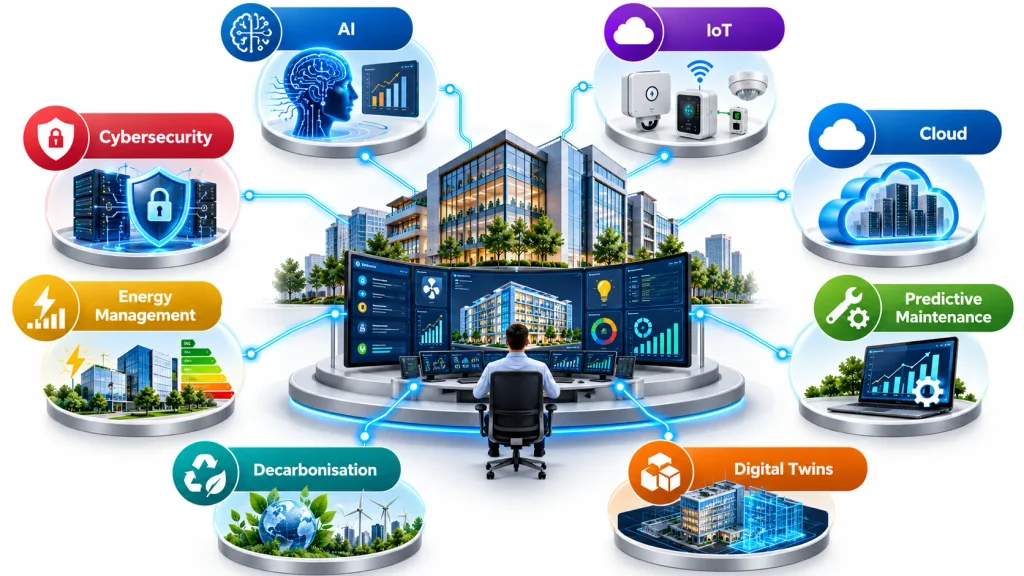
Building Management Systems are evolving from basic monitoring and automated control platforms into more connected, intelligent and data-driven solutions. Modern BMS technology is increasingly focused on improving energy efficiency, predicting equipment problems, supporting decarbonisation and helping facility teams make better operational decisions.
Several key trends are shaping the future of BMS technology.
AI-Powered Fault Detection
Artificial intelligence is becoming increasingly important in building management. AI-powered systems can analyse large amounts of operational data to identify unusual patterns, detect potential faults and highlight equipment that may require attention.
Instead of relying only on fixed alarm thresholds, advanced systems can compare current performance with historical operating patterns. This can help facility teams identify issues earlier and focus maintenance efforts on the problems that are most important.
Cloud-Based Building Analytics
Cloud-based BMS platforms allow building data to be accessed and analysed through centralised systems. This is particularly useful for organisations managing multiple buildings or sites.
Cloud analytics can provide:
- Centralised monitoring
- Portfolio-level performance analysis
- Remote access to building data
- Energy and equipment performance reporting
- Easier comparison between different sites
This trend is helping organisations move from managing individual buildings to monitoring entire property portfolios.
IoT Integration
The Internet of Things (IoT) is expanding the number of connected devices used within buildings. Sensors, meters, controllers and equipment can generate detailed operational data and communicate with building management platforms.
Greater IoT connectivity can provide more accurate information about occupancy, temperature, energy consumption, equipment condition and environmental conditions. This additional data can support more responsive automation and better building performance analysis.
Predictive Maintenance
Traditional maintenance often depends on fixed schedules or responding after equipment has developed a fault. Predictive maintenance uses operational data to identify signs of potential equipment deterioration.
For example, unusual changes in temperature, vibration, energy consumption or equipment runtime may indicate developing problems. BMS analytics can help identify these patterns early, allowing maintenance teams to investigate before a major failure occurs.
Digital Twins
Digital twin technology is becoming increasingly relevant to smart building management. A digital twin creates a digital representation of a physical building, its systems and associated operational information.
When connected with BMS data, digital twins can help organisations understand building performance, examine system interactions and evaluate potential operational changes. This can support planning, optimisation and building performance analysis.
Decarbonisation and Energy Management
Energy efficiency and carbon reduction are becoming major priorities for building operators. BMS platforms can provide the operational data needed to understand where energy is being consumed and where improvements may be possible.
BMS technology can support:
- Energy consumption monitoring
- HVAC optimisation
- Load management
- Renewable energy integration
- Carbon performance tracking
- Identification of energy waste
As organisations work towards lower-carbon buildings, BMS data is likely to play an increasingly important role in energy and sustainability strategies.
Cybersecurity
Greater connectivity also creates greater cybersecurity requirements. Modern BMS platforms may connect building equipment with corporate networks, cloud platforms and remote-access services, making secure system design increasingly important.
Future BMS solutions are expected to place greater emphasis on secure communication, access control, network segmentation, system updates, monitoring and coordination between information technology (IT) and operational technology (OT) teams.
More Integrated Building Platforms
Another important direction is greater integration between traditionally separate building systems. HVAC, lighting, access control, energy monitoring, fire-related interfaces and other building technologies can increasingly exchange information through common platforms and communication protocols.
This can give facility teams a more complete view of building operations and support coordinated control rather than managing each system independently.
Overall, the future of BMS is moving towards systems that do more than simply monitor and control equipment. AI, cloud analytics, IoT, predictive maintenance, digital twins, energy optimisation and cybersecurity are helping create more connected and intelligent building environments.
What are the Weaknesses of Traditional BMS?
Traditional BMS platforms can be highly effective for monitoring and control, but several limitations should be recognised:
- They may provide limited advanced analytics.
- Fault alarms may identify symptoms without identifying root causes.
- Energy data may not always be sufficiently granular.
- Legacy systems can be difficult to integrate.
- Operators may receive excessive alarms.
- Data quality can vary between devices.
- Proprietary architectures can make future integration more difficult.
- Skilled operators may be required.
- Remote connectivity introduces additional cybersecurity requirements.
These limitations explain why modern building platforms increasingly combine BMS data with analytics, IoT, AI and maintenance-management technologies. CIM, for example, specifically notes limitations around detailed energy monitoring and precise fault detection in traditional BMS environments.
What Makes a BMS Effective?
The effectiveness of a BMS depends on more than the software platform.
A successful BMS normally combines:
Good Design + Accurate Sensors + Appropriate Controls + Reliable Integration + Proper Commissioning + Trained Operators + Effective Maintenance
If one element is weak, overall performance can suffer.
For example, advanced analytics cannot reliably identify equipment faults if sensors are incorrectly calibrated. Similarly, accurate sensors cannot deliver good results if control sequences are poorly programmed.
Conclusion
A successful Building Management System installation depends on careful planning, appropriate system design and thorough commissioning rather than hardware installation alone. From the initial site assessment and scope definition to device selection, programming, testing and operator training, each stage contributes to reliable building automation and control.
A well-designed BMS can provide better visibility of building operations, improve HVAC and energy management, support faster fault response and provide useful performance data. Proper documentation and staff training also help ensure that the system continues to deliver value after installation.
As buildings become more connected and energy-conscious, a professionally planned and commissioned BMS can provide a strong foundation for efficient, responsive and intelligent building management.