What is a Document Controller? Complete Guide to Courses, Skills, Responsibilities and Career Opportunities
In modern organisations, effective document management is essential for maintaining accurate information, supporting compliance and ensuring that employees can access the right documents when needed. A Document Controller plays an important role in organising, tracking, updating and distributing controlled documents across projects and organisations.
Document Controllers are particularly important in industries where large volumes of technical, commercial, quality, safety and project documentation must be managed accurately. These industries include construction, engineering, oil and gas, manufacturing, healthcare, infrastructure, energy and information technology.
A Document Controller course can help learners develop practical knowledge of document management procedures, document numbering, revision control, electronic document management systems, records management, information security and document distribution.
This complete guide explains what a Document Controller is, what a Document Controller does, essential skills, responsibilities, course requirements, career opportunities, workplace applications and professional development.
What Is a Document Controller?
A Document Controller is a professional responsible for managing the creation, organisation, storage, distribution, tracking and retrieval of documents within an organisation or project.
The role is not simply about filing documents. A Document Controller helps ensure that the correct version of a document reaches the correct person at the correct time.
In a construction or engineering project, for example, hundreds or thousands of documents may be generated during design, procurement, construction, inspection and completion. These can include:
- Drawings
- Specifications
- Contracts
- Method statements
- Inspection reports
- Quality records
- Safety documents
- Material approvals
- Technical submissions
- Meeting minutes
- Correspondence
- Progress reports
- As-built drawings
- Certificates
- Test reports
Without an effective document control process, outdated or incorrect information may be used, resulting in delays, rework, misunderstandings, compliance problems and financial losses.
A Document Controller therefore supports information accuracy, traceability, accessibility and accountability.
What Does a Document Controller Do?
The exact responsibilities depend on the organisation, industry and project. However, the core purpose remains the controlled management of information.
Typical Document Controller duties include:
- Receiving documents from internal and external stakeholders.
- Checking documents against established requirements.
- Registering documents in a document control system.
- Assigning document numbers and metadata.
- Tracking document revisions.
- Maintaining document registers.
- Distributing approved documents.
- Controlling access to sensitive information.
- Archiving superseded documents.
- Maintaining electronic and physical records.
- Tracking document review and approval status.
- Supporting audits and compliance activities.
- Preparing document control reports.
- Monitoring document submission deadlines.
- Maintaining document traceability.
The role requires attention to detail because even a small documentation error can affect a project or business process.
Why Is Document Control Important?
Document control provides a structured approach to managing organisational information throughout its lifecycle.
An effective document control system helps organisations:
Maintain Accurate Information
Document control reduces the risk of employees using outdated, incomplete or unauthorised documents.
Improve Traceability
Documents can be tracked from creation through review, approval, revision, distribution and archiving.
Support Compliance
Controlled records can provide evidence that organisational processes have been followed.
Reduce Duplication
A structured system helps prevent unnecessary duplication of documents and information.
Improve Communication
Employees and project stakeholders can access controlled information through established distribution processes.
Protect Confidential Information
Access controls can help restrict sensitive documents to authorised personnel.
Support Audits
Well-maintained records make it easier to demonstrate how documents were created, reviewed, approved and controlled.
Document Controller vs Document Management
| Aspect | Document Controller | Document Management |
|---|---|---|
| Definition | A professional role responsible for controlling and tracking documents | A broader system and process for managing organisational documents |
| Primary Focus | Document accuracy, revision, distribution and status | Organisation, storage, retrieval, security and lifecycle management |
| Main Responsibility | Ensures documents are properly registered, reviewed, approved and distributed | Establishes systems and processes for managing documents effectively |
| Revision Control | Tracks document revisions and ensures current versions are available | Provides systems and processes that support version management |
| Document Distribution | Controls and records document distribution | Provides the framework or technology for document access and sharing |
| Document Storage | Maintains documents according to organisational procedures | Determines how documents are stored, organised and retrieved |
| Document Retrieval | Locates and provides controlled documents when required | Provides structured systems for efficient document searching and retrieval |
| Archiving | Archives superseded and completed documents | Establishes broader retention and archiving processes |
| Technology | Uses document registers, EDMS platforms and office software | Includes the technologies, systems and processes used for document management |
| Compliance | Helps ensure documents follow established control procedures | Supports organisational information governance and document management requirements |
| Typical Outcome | Accurate, controlled and traceable documents | Efficient, secure and structured management of organisational information |
Key Responsibilities of a Document Controller
Document Registration
Incoming and outgoing documents need to be recorded systematically. A Document Controller may maintain a document register containing information such as:
- Document number
- Document title
- Revision number
- Document type
- Originator
- Date received
- Review status
- Approval status
- Distribution information
This creates a reliable record of document activity.
Revision Control
Documents often change throughout a project or operational process.
A drawing, procedure or specification may have several revisions. The Document Controller helps ensure that:
- New revisions are correctly identified.
- Previous revisions are controlled.
- Approved revisions are distributed.
- Superseded versions are archived.
- Users can identify the current version.
Revision control is particularly important in construction, engineering and manufacturing environments.
Document Distribution
Controlled documents must reach the appropriate recipients.
Distribution may take place through:
- Electronic document management systems
- Project portals
- Shared platforms
- Physical document packages
- Controlled registers
The Document Controller records distribution information to maintain traceability.
Document Retrieval
A well-organised document control system allows authorised personnel to locate required information efficiently.
Poor filing systems can cause significant time loss because employees may spend considerable time searching for documents.
Document Archiving
Superseded or completed documents may need to be archived according to organisational procedures.
Archiving helps preserve historical records while preventing obsolete documents from being confused with current documents.
Document Status Tracking
A Document Controller may track whether a document is:
- Draft
- Submitted
- Under review
- Returned
- Approved
- Approved with comments
- Rejected
- Superseded
- Archived
This provides stakeholders with visibility of document progress.
Essential Document Controller Skills
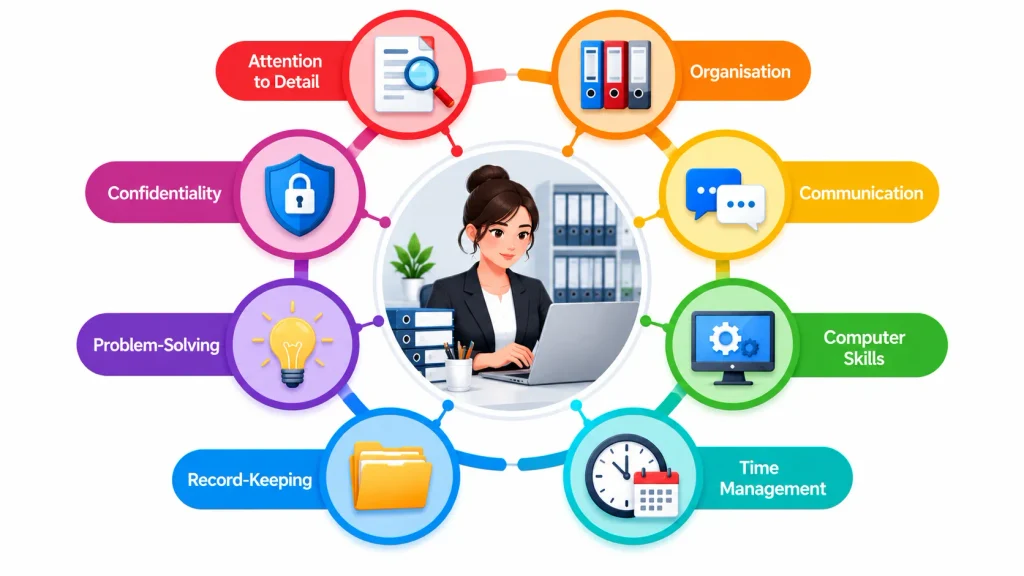
A successful Document Controller needs a combination of technical, administrative, organisational and communication skills.
Attention to Detail
Document Controllers routinely deal with document numbers, dates, revisions, titles, codes and status information.
Strong attention to detail helps reduce errors.
Organisation
Large projects can generate thousands of documents. Strong organisational skills help maintain structured records and efficient workflows.
Communication
Document Controllers communicate with engineers, project managers, contractors, consultants, suppliers, quality teams and other stakeholders.
Clear communication is therefore an important workplace skill.
Computer Skills
Modern document control is heavily dependent on digital systems.
Useful computer skills include:
- Microsoft Word
- Microsoft Excel
- PDF management
- Email systems
- Cloud storage
- Database applications
- Document management platforms
- Electronic document management systems
Time Management
Documents may have submission, review and approval deadlines. Effective time management helps ensure that documentation is processed within required timescales.
Problem-Solving
Document Controllers may encounter missing information, duplicate documents, incorrect revisions or incomplete submissions.
The ability to identify problems and follow established procedures for resolving them is valuable.
Confidentiality
Some organisational documents may contain commercially sensitive or confidential information. Document Controllers need to understand information access and confidentiality requirements.
Record-Keeping
Accurate records are central to effective document control. A Document Controller should be capable of maintaining clear and traceable records.
What Is a Document Controller Course?
A Document Controller course is a professional training programme designed to develop knowledge and practical skills in document management and document control.
Course content can vary depending on the provider and qualification level, but relevant subjects commonly include:
- Introduction to document control
- Document lifecycle management
- Document numbering systems
- Document registers
- Revision control
- Document distribution
- Document filing
- Electronic document management
- Records management
- Document status tracking
- Information security
- Document quality checks
- Audit preparation
- Document control procedures
- Project documentation
- Reporting and communication
A suitable course can provide learners with a structured understanding of how document control operates in professional environments.
What Do Learners Study on a Document Controller Course?
A well-designed course should cover both the principles and practical application of document control.
Unit 1: Introduction to Document Control
Learners can explore the purpose of document control, the role of a Document Controller and the importance of accurate information management.
Unit 2: Document Registration and Classification
This area focuses on document identification, numbering, classification, metadata and document registers.
Unit 3: Document Revision and Version Control
Learners examine how document revisions are created, recorded, approved and distributed.
Unit 4: Document Distribution and Tracking
This area covers controlled distribution, transmittals, document status and stakeholder communication.
Unit 5: Electronic Document Management Systems
Learners develop awareness of digital document repositories, access permissions, workflows, electronic records and document retrieval.
Unit 6: Records Management and Archiving
This unit can cover retention, archiving, retrieval, storage and management of completed or superseded records.
Unit 7: Document Control in Projects
Learners explore the role of document control within construction, engineering and other project environments.
Unit 8: Quality, Compliance and Audit Support
This area focuses on maintaining reliable records, supporting audits and following organisational document control procedures.
Who Can Enrol on a Document Controller Course?
A Document Controller course can be suitable for learners from different professional backgrounds.
Potential learners include:
- Aspiring Document Controllers
- Administrative professionals
- Project administrators
- Project coordinators
- Construction professionals
- Engineering support staff
- Quality professionals
- Site administrators
- Project assistants
- Records management staff
- Office professionals
- Technical administrators
- Professionals seeking document control skills
The appropriate entry requirements depend on the specific course and awarding organisation.
Document Controller Course Requirements
Course requirements vary between training providers.
Some introductory courses may not require extensive previous experience, making them suitable for learners entering the field.
More advanced programmes may expect:
- Previous administrative experience
- Project documentation experience
- Industry knowledge
- Basic computer skills
- Understanding of organisational procedures
Learners should always check the specific entry requirements before enrolment.
Where Do Document Controllers Work?
Document Controllers are required across many sectors.
Construction
Construction projects generate substantial documentation, including drawings, specifications, inspection records, method statements and handover documents.
Engineering
Engineering organisations use document control to manage technical drawings, calculations, specifications, reports and project records.
Oil and Gas
Large energy projects require structured management of technical, engineering, procurement, construction and commissioning documentation.
Manufacturing
Manufacturers may use document control for procedures, specifications, quality records, work instructions and production documentation.
Infrastructure
Infrastructure projects can involve extensive engineering, environmental, contractual and regulatory documentation.
Healthcare
Healthcare organisations manage policies, procedures, records and controlled information that require structured document management.
Information Technology
Technology organisations may use document control for technical documentation, procedures, policies, project records and system documentation.
Energy and Utilities
Energy projects can involve extensive technical, compliance, operational and maintenance documentation.
Document Controller in Construction
Construction is one of the industries where document control has a particularly important role.
A construction project may involve:
Client → Consultant → Contractor → Subcontractor → Supplier
Information must move between these stakeholders in a controlled manner.
A Document Controller may manage:
- Construction drawings
- Shop drawings
- Technical submittals
- Material approvals
- Inspection requests
- Method statements
- Risk assessments
- Quality records
- Test certificates
- Site reports
- Correspondence
- Requests for information
- As-built documentation
Effective control helps ensure that project teams work from the appropriate information.
Document Controller in Engineering
Engineering projects depend heavily on accurate technical information.
A Document Controller may work with:
- Engineering drawings
- Design calculations
- Technical specifications
- Equipment datasheets
- Inspection documents
- Test reports
- Engineering change notices
- Technical queries
- Approval records
- Commissioning documentation
Revision control is particularly important because technical changes can affect project execution and safety.
What Is an Electronic Document Management System?
An Electronic Document Management System (EDMS) is a digital platform used to store, organise, manage, retrieve and control documents electronically.
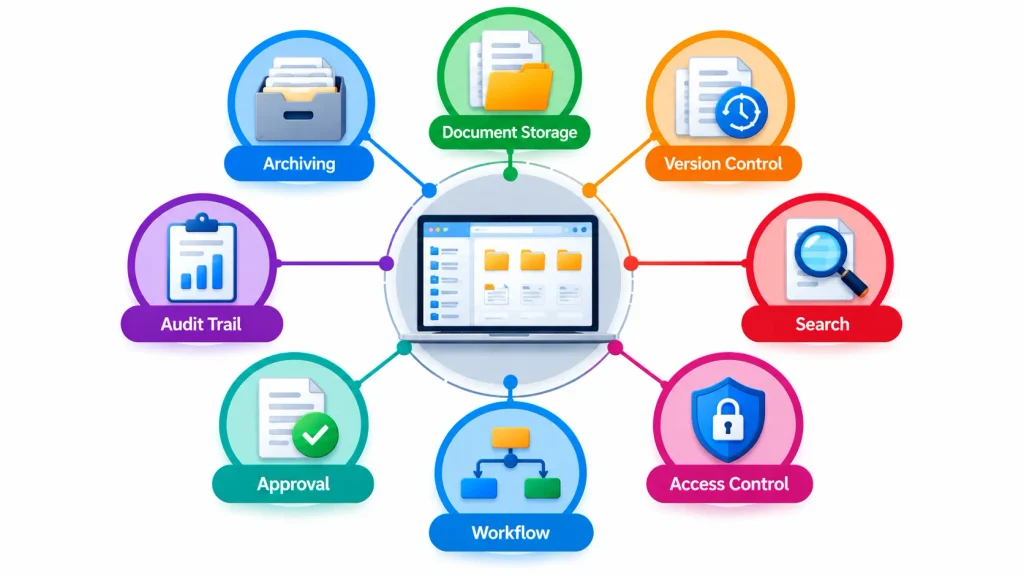
An EDMS may provide functions such as:
Document Storage
Document storage involves securely saving documents in a structured digital or physical location. It helps authorised users access and manage information efficiently.
Version Control
Version control tracks changes made to documents and identifies the latest approved version. It helps prevent outdated documents from being used.
Search
Search functions help users quickly locate documents using keywords, document numbers, titles or other information. This reduces time spent looking for records.
Metadata
Metadata is information that describes a document, such as its title, author, date, document number and status. It helps documents remain organised and searchable.
Access Permissions
Access permissions control who can view, edit, download or share specific documents. They help protect confidential and sensitive information.
Workflow Management
Workflow management controls the movement of documents through different stages, such as submission, review and approval. It helps standardise document processes.
Approval Processes
Approval processes ensure documents are reviewed and authorised by the appropriate personnel before official use. This supports accuracy and accountability.
Audit Trails
Audit trails record activities performed on documents, including changes, approvals and access. They provide traceability of document activity.
Document Review
Document review involves checking content for accuracy, completeness and compliance with requirements. It helps identify errors before documents are approved or distributed.
Notifications
Notifications alert relevant users when documents are submitted, revised, reviewed or approved. They help stakeholders respond to document-related actions on time.
Archiving
Archiving involves moving completed or superseded documents into controlled long-term storage. It preserves important records while keeping active document areas organised.
Document Controllers increasingly need digital skills because many organisations have moved from paper-based systems to electronic document control.
Common Document Control Software and Platforms
The specific software used depends on the organisation.
Examples can include:
- Microsoft SharePoint
- Autodesk Construction Cloud
- Aconex
- Procore
- OpenText
- ProjectWise
- Documentum
- Microsoft Excel
- Microsoft Word
- PDF management tools
Learners do not necessarily need expertise in every platform. The more transferable skill is understanding document control principles and workflows, because different organisations may use different systems.
Document Control Process
A typical document control workflow may follow this sequence:
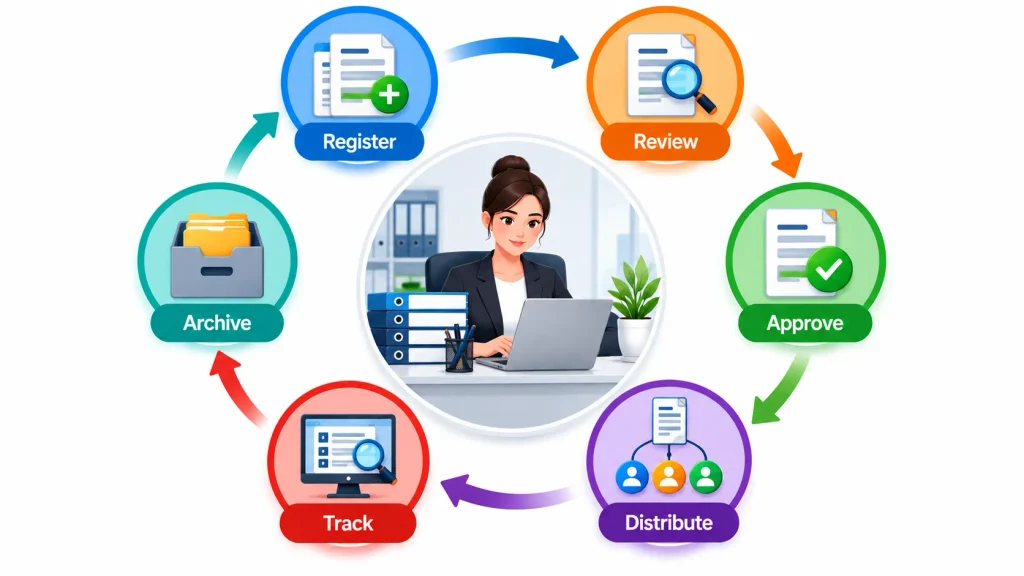
Create → Register → Review → Approve → Distribute → Revise → Supersede → Archive
Step 1: Create
A document is prepared by the responsible individual or department.
Step 2: Register
The document is entered into the appropriate register or system.
Step 3: Review
The document is checked by authorised personnel.
Step 4: Approve
The appropriate authority approves the document according to organisational procedures.
Step 5: Distribute
The approved document is made available to authorised recipients.
Step 6: Revise
If changes are required, a new revision is produced.
Step 7: Supersede
The previous version is identified as superseded.
Step 8: Archive
Relevant records are retained according to organisational requirements.
Document Controller Career Opportunities
Document control skills can support careers across administrative, technical and project environments.
Potential job titles include:
- Document Controller
- Senior Document Controller
- Project Document Controller
- Technical Document Controller
- Document Control Coordinator
- Document Control Administrator
- Project Administrator
- Records Coordinator
- Information Coordinator
- Document Management Specialist
Career progression depends on experience, qualifications, industry knowledge, technical skills and organisational requirements.
Junior Document Controller vs Senior Document Controller
The responsibilities of a Document Controller can develop significantly with experience.
| Area | Junior Document Controller | Senior Document Controller |
|---|---|---|
| Document registration | Performs routine registration | Oversees registration processes |
| Document distribution | Follows established procedures | Manages complex distribution workflows |
| Revision control | Updates document records | Oversees revision systems |
| Reporting | Produces basic reports | Analyses document control performance |
| Stakeholder communication | Routine communication | Coordinates multiple stakeholders |
| Systems | Uses established systems | May support system configuration |
| Compliance | Follows procedures | Helps improve compliance processes |
| Team responsibility | Individual tasks | May supervise document control teams |
Benefits of Taking a Document Controller Course
A structured course can provide several professional benefits.
Develops Practical Knowledge
Learners gain an understanding of how documents are controlled throughout their lifecycle.
Improves Employability
Document control skills can be relevant to many industries and project environments.
Supports Career Entry
A course can provide foundational knowledge for learners seeking entry-level document control roles.
Builds Digital Skills
Learners can develop awareness of electronic document management systems and digital workflows.
Improves Organisational Skills
Document control training reinforces structured filing, tracking and information management practices.
Supports Professional Development
Existing administrators and project staff can use document control knowledge to strengthen their professional skill set.
How to Become a Document Controller
A typical pathway can involve the following steps:
Step 1: Develop Basic Computer Skills
Learners should become comfortable with word processing, spreadsheets, email and digital file management.
Step 2: Study Document Control
A relevant Document Controller course can provide structured knowledge of document control principles and procedures.
Step 3: Develop Industry Knowledge
Knowledge of construction, engineering, manufacturing or another target industry can be beneficial.
Step 4: Develop Practical Skills
Learners can practise document registers, revision tracking, filing structures, document numbering and reporting.
Step 5: Gain Workplace Experience
Administrative, project support or technical office experience can help develop practical competence.
Step 6: Apply for Relevant Roles
Potential entry-level roles can include Document Controller, Document Control Assistant, Project Administrator and Document Control Coordinator.
What Employers May Look for in a Document Controller
Employer requirements vary, but common expectations may include:
- Document control knowledge
- Strong organisation
- Attention to detail
- Computer literacy
- Communication skills
- Microsoft Office knowledge
- Document management experience
- Understanding of revision control
- Ability to maintain accurate records
- Ability to work with deadlines
- Confidentiality awareness
- Problem-solving ability
In technical industries, employers may also value familiarity with engineering or construction documentation.
Common Document Controller Challenges
Document Controllers can face several workplace challenges.
Duplicate Documents
Multiple copies can create confusion and increase the risk of using incorrect information.
Uncontrolled Revisions
Documents may be updated without appropriate tracking.
Missing Information
Incomplete submissions can delay review and approval.
Poor Naming Conventions
Inconsistent file names can make documents difficult to locate.
Unclear Responsibilities
If ownership is unclear, documents may not be reviewed or approved on time.
Large Document Volumes
Major projects can generate thousands of documents, requiring efficient systems and procedures.
Multiple Stakeholders
Different contractors, consultants and departments may have different documentation requirements.
Document Controller Skills for the Future
As organisations become increasingly digital, Document Controllers need to understand more than traditional filing systems.
Future-focused skills may include:
- Digital document management
- Data organisation
- Information security awareness
- Cloud-based collaboration
- Workflow management
- Electronic approvals
- Metadata management
- Audit trail management
- Digital records management
- Information governance awareness
In construction and engineering, knowledge of Building Information Modelling (BIM) and common data environments can also complement document control knowledge.
Conclusion
A Document Controller helps organisations keep documents accurate, organised, updated and easy to access. A Document Controller course develops essential skills in document management, revision control, record-keeping and digital systems. These skills can support career opportunities across construction, engineering, energy, manufacturing and other industries.